 Sunlite Systems Pvt. Ltd.






Cisco Meeting Room Solutions: What Professional Installation Actually Involves
Why Installation Quality Defines the Meeting Room Experience
Cisco's Webex room kits, IP phones, and supporting networking equipment have become a common backbone for hybrid meeting infrastructure in Indian offices, government departments, and institutions, but the equipment's reputation for reliability only holds true when installation is done properly. Cisco meeting room solutions depend heavily on correct network configuration, camera and microphone placement, and integration with a room's display and control systems — get any of these wrong and even genuinely excellent hardware produces a frustrating meeting experience, whether that is remote participants struggling to hear the room, a camera that fails to frame participants well, or a room system that will not reliably join scheduled calls.
Unlike simpler AV equipment, Webex room kits are fundamentally networked devices that need to register with a cloud or on-premises calling service, authenticate correctly, and often interact with room-booking systems and calendar integrations. This makes installation a genuinely cross-disciplinary task spanning physical AV installation, enterprise networking, and software configuration — and it is why organisations should evaluate meeting room integrators specifically on their networking and Cisco collaboration platform experience, not just general AV installation history.
What Cisco Meeting Room Installation Actually Involves
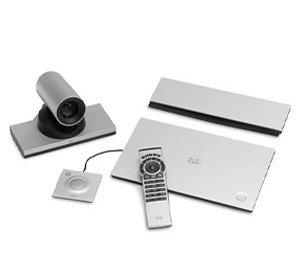
Installation begins with physical setup — mounting the Webex room kit's camera and speaker bar at the correct height and position for good framing and audio pickup across the room, connecting the display it will drive, and installing any additional microphones needed for larger rooms where the built-in microphone array alone will not adequately cover the space. Network configuration follows, connecting the room kit to the corporate network, working with the client's IT team to open necessary firewall ports or configure the appropriate proxy settings, and registering the device with Cisco's Webex cloud service or the organisation's on-premises call control infrastructure, depending on which deployment model the organisation uses.
Beyond basic connectivity, proper installation includes configuring calendar integration so the room system displays scheduled meetings and allows one-touch join, setting up room-booking display panels outside the room where used, and integrating the room kit with any existing control system or touch panel so meeting participants have a single, simple interface rather than multiple remote controls and devices to manage. Where IP phones are part of the deployment, installation includes registering each handset with the call control platform, configuring extensions, and testing call quality across the network. A thorough installer also validates network quality specifically for real-time video and audio traffic, checking for adequate bandwidth and appropriately prioritised traffic so that video calls do not degrade during periods of general network congestion.
Finally, proper installation includes documenting network settings, device registrations, and room configuration for the client's IT team, since ongoing management of a meeting room fleet — firmware updates, configuration changes, adding new rooms — depends on this information being available rather than locked inside the original installer's memory.
How to Choose the Right Cisco Meeting Room Integrator
Ask prospective integrators specifically about their experience with Webex device registration and network configuration, including firewall and proxy requirements, rather than assuming general AV experience covers this adequately. A competent integrator should ask detailed questions about the client's existing network infrastructure, calling platform, and IT policies before quoting a project, since these details significantly affect both the installation approach and the equipment configuration needed.
Request examples of similarly scaled projects — a single meeting room deployment is a very different undertaking from a multi-room, multi-floor rollout with centralised device management, and an integrator experienced only with the former may struggle to plan the latter efficiently. It is also worth asking how the integrator collaborates with the client's internal IT department, since Cisco meeting room deployments almost always require IT involvement for network changes, and a good integrator should be comfortable working alongside internal IT rather than expecting to handle every aspect independently. Finally, confirm what ongoing support looks like — firmware update management, remote troubleshooting, and support for adding new rooms later are all meaningful parts of a long-term relationship with a meeting room integrator.
Site Prep and Planning Before Installation
Planning should start with a room-by-room assessment of size, typical participant count, and acoustic characteristics, since these determine whether a single integrated room kit is sufficient or whether additional microphones and speakers are needed for larger rooms. Network readiness planning is equally important — confirming there is adequate network capacity, appropriate VLAN configuration if required by IT policy, and a clear process for opening any firewall ports the room kit needs for cloud registration and calling.
Physical planning should confirm mounting positions for cameras and displays that avoid backlighting from windows, which can significantly degrade video quality for remote participants, and should map cable pathways for power, network, and any control interfaces, ideally coordinated before ceiling or wall finishing work is complete in new or renovated spaces. Where room-booking panels are planned, planning should also confirm calendar system integration requirements early, since this often involves coordination with the client's messaging or email platform administrator rather than just the AV installer.
Step-by-Step: What to Expect During Installation
Installation typically begins with a design and network-requirements confirmation meeting involving both the integrator and the client's IT representative. First-fix work follows — cabling for power, network, and displays pulled through ceiling voids or conduit as needed. Equipment mounting comes next: the room kit's camera and speaker bar are mounted, the display is installed, and any additional microphones are fitted for larger rooms.
Network configuration and device registration follow, connecting the room kit to the network and registering it with the calling platform, coordinated closely with IT for any firewall or proxy changes required. Integration testing comes next, confirming calendar display and one-touch join function correctly, and conducting a live test call to check audio and video quality from a remote participant's perspective, not just locally in the room. The final stage is handover, training the client's team on daily use — starting a scheduled meeting, adjusting camera framing, or joining an ad hoc call — and delivering network and configuration documentation to the client's IT department for ongoing management. Throughout the process, disruption should be minimised by scheduling installation around the room's existing meeting bookings.
Common Installation Mistakes to Avoid
A frequent mistake is under-assessing network readiness, installing a room kit without properly coordinating firewall and bandwidth requirements with IT beforehand, leading to registration failures or poor call quality once the system goes live on the actual corporate network rather than a test environment. Another common error is poor camera and display placement, mounting the camera facing a bright window, which causes remote participants to see poorly lit, backlit silhouettes of local meeting attendees.
Skipping calendar integration configuration is another recurring gap, leaving a room system that works technically but does not show scheduled meetings or support one-touch join, undermining much of the day-to-day convenience the system is meant to provide. Failing to conduct a genuine live test call with a remote participant before handover is also common, since some audio and network issues only surface under real call conditions. Finally, neglecting to document network settings and device registrations leaves the client's IT team unable to manage the system independently, creating unnecessary dependence on the original installer for routine changes.
Sector Scenario: Rolling Out Meeting Rooms Across a Corporate Campus
Consider a corporate campus standardising meeting room technology across twelve rooms of varying sizes. The integrator's survey categorises rooms into small huddle spaces, mid-size meeting rooms, and one large boardroom, recommending an appropriately sized Webex room kit configuration for each category and additional microphones for the boardroom given its size. Network planning is coordinated closely with the client's IT team, confirming VLAN segregation for room kit traffic and opening the specific firewall ports required for cloud registration across all twelve rooms.
Installation proceeds room by room, with mounting, cabling, and network registration completed in batches to minimise disruption to daily office use. Calendar integration is configured centrally so every room displays its schedule and supports one-touch join, and room-booking panels are installed outside each room. Before full handover, the integrator conducts live test calls from a sample of rooms across different network segments to confirm consistent call quality campus-wide, then trains a designated group of office staff as first-line support contacts, backed by full technical documentation delivered to the IT department for ongoing management.
GeM and Institutional Meeting Room Deployments
Government departments and public institutions increasingly specify Cisco collaboration equipment through GeM tenders for conference rooms, training facilities, and video-based hearings or reviews, reflecting the wider shift toward hybrid meeting capability in public administration. These projects require strict adherence to tender-specified equipment and network configuration outcomes, along with formal commissioning reports and IT sign-off before payment release. As a GeM-registered vendor, Sunlite Systems Pvt Ltd approaches institutional Cisco meeting room deployments with close coordination between AV installation and the department's IT or networking team, ensuring the delivered system meets both the tender specification and the practical operating needs of government staff using it daily.

Frequently Asked Questions
Does a Webex room kit need a dedicated internet connection? Not necessarily a dedicated connection, but it does need adequate bandwidth and appropriate network configuration, which a proper site survey and IT coordination will confirm.
Can existing displays be reused with a new room kit installation? Often yes, provided the display has a compatible input and is appropriately sized for the room, which the integrator can confirm during planning.
How long does a multi-room rollout typically take? This depends on the number of rooms and network complexity, but rollouts are commonly phased in batches to manage disruption and allow testing between phases.
Who is responsible for firewall and network changes — the integrator or internal IT? This is typically a joint effort, with the integrator specifying requirements and the client's IT team implementing changes within their own network policies.
What is the best way to test a new meeting room before regular use begins? A live test call involving an actual remote participant, checking both audio and video quality from their end, is the most reliable way to catch issues before daily use begins.
Closing Summary
Reliable Cisco meeting room solutions depend on installation work that treats networking, device configuration, and physical placement as equally important — not just mounting a camera and calling the job done. From single-room deployments to campus-wide rollouts and GeM-procured government facilities, the process outlined here — survey, network planning, installation, configuration, live testing, and documented handover — is what separates a meeting room that works from one that constantly frustrates its users. For related integration guidance, see our Crestron smart boardroom setup guide and our Ahuja PA setup services guide. Product options are available at the Sunlite Systems Online Store, with company information at Sunlite Systems Pvt Ltd and Sunlite Systems India, and other Sunlite retail offerings at our Rudraksh India store.
Network Readiness for Webex Room Kits
A Cisco Webex room kit installation is as much a network project as an AV project. Before any hardware is mounted, the network needs sufficient dedicated bandwidth for video calls, appropriate QoS prioritization, and ideally a separate VLAN for meeting-room devices. Firewall and port configuration is another prerequisite easy to overlook until a call fails to connect externally.
A Second Scenario: Telemedicine and Consultation Rooms in Healthcare Settings
Healthcare institutions increasingly use Webex for telemedicine consultations, a use case with different requirements than a typical office boardroom. Reliability expectations are higher since a dropped call may directly affect patient care. Privacy and room acoustics carry different weight — microphone and speaker placement needs to avoid picking up conversations from adjoining rooms or corridors.
Post-Installation Support and AMC Planning
A Webex-equipped meeting room benefits from a clear post-installation support plan covering periodic firmware verification, network performance checks for the room's dedicated VLAN, and confirmation that camera framing still matches the room if furniture has changed.
Does a Webex room kit installation require ongoing licensing considerations beyond the initial hardware setup?
Yes — Webex room kits typically operate alongside a software subscription separate from the physical installation. It's worth clarifying who manages license renewal at installation time.
Can an existing meeting room's basic video conferencing setup be upgraded to a full Webex room kit without rewiring the room?
Often yes, provided the room already has adequate network infrastructure and display mounting. The main additional work is usually network readiness and acoustic assessment rather than a full rewire.
Explore More — Sunlite Systems Network
Ready to Install Cisco Equipment?
Sunlite Systems Pvt Ltd is a GeM-registered, authorized Cisco installation partner across India.
Contact Us Now