 Sunlite Systems Pvt. Ltd.




Biamp Office Audio System Setup: How DSP-Driven Audio Installation Works
Why DSP-Based Audio Deserves a More Careful Installation Approach
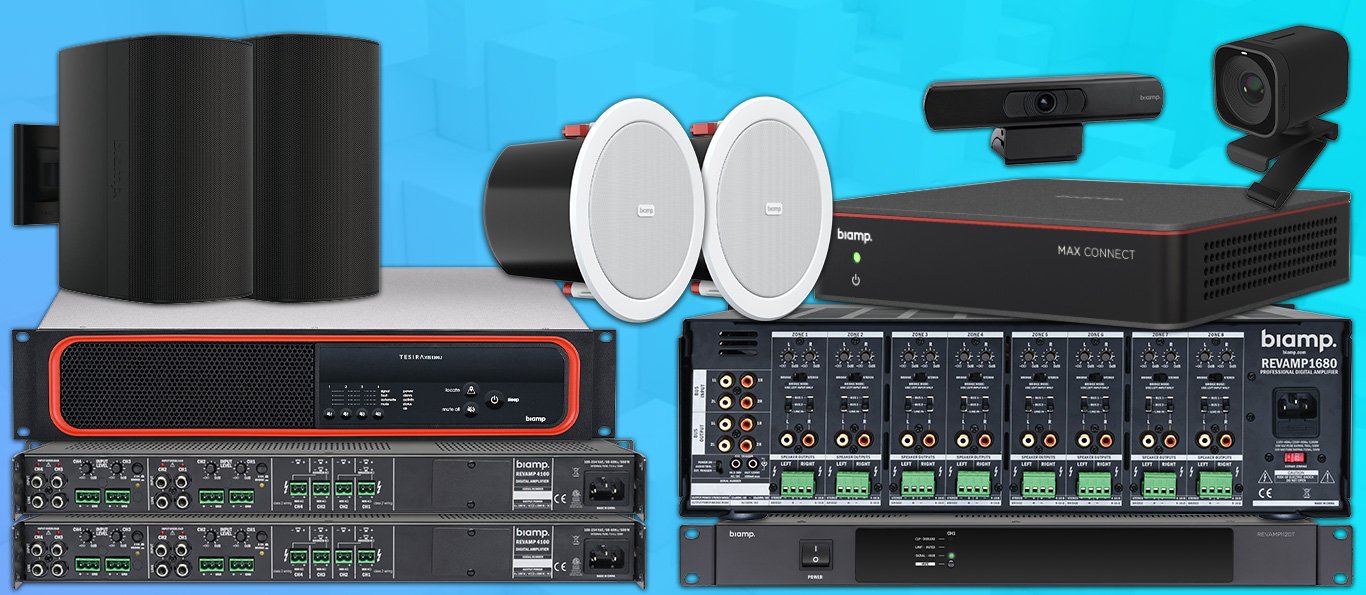
Biamp's audio DSP platforms sit at the technical core of many modern office and institutional audio systems, handling everything from conference-room microphone processing to building-wide paging integration. Because a DSP is essentially a programmable audio brain rather than a fixed-function amplifier, Biamp office audio system setup requires a different level of installation expertise than a simple speaker-and-amplifier job. The DSP has to be configured — not just wired — to correctly process microphone inputs, cancel echo in conferencing scenarios, route audio to the right zones, and interface cleanly with whatever conferencing or paging equipment sits alongside it, whether that is a Cisco Webex room kit, a Crestron control system, or an existing analogue paging network.
This configuration-heavy nature is precisely why office audio projects built around Biamp DSPs benefit from an installer who understands both the physical installation trade — cable routing, rack mounting, gain structure — and the software side of DSP programming, echo cancellation tuning, and network audio protocols where applicable. Getting the hardware installed correctly but the DSP poorly configured produces a system that looks complete but performs poorly — call participants hear echo, paging volume is inconsistent between zones, or microphone pickup is uneven across a large conference table.
What Biamp Office Installation Actually Involves
A typical Biamp office deployment begins with defining the audio zones and use cases the DSP needs to serve — conference room microphone and speaker processing, background paging across open office areas, or both integrated through a single processing unit. Physical installation covers mounting the DSP unit in an equipment rack, installing ceiling or table microphones positioned for even pickup across a meeting table or room, connecting loudspeakers for both program audio and conferencing playback, and wiring any required control interfaces so a room's touch panel or control system can adjust volume or mute microphones.
The configuration phase is where a Biamp installation genuinely differs from simpler audio setups. The installer must program the DSP's signal flow — routing microphone inputs through echo cancellation and noise reduction processing, setting appropriate gain levels for each microphone and speaker zone, and configuring automatic mixing so that multiple microphones in a room blend naturally without one dominating or causing feedback. Where the DSP interfaces with a video conferencing platform, the audio path needs to be configured so remote participants hear clear, echo-free audio and local participants hear remote audio without any noticeable delay or artifacts. Where the same DSP also handles building paging, zone routing and priority settings need to be configured so that a paging announcement correctly overrides background audio in the right areas without affecting unrelated zones.
A properly finished installation also includes documentation of the DSP's configuration file, network settings if the unit is IP-networked, and a simple reference for facilities staff covering routine adjustments like volume changes, distinct from configuration changes that should only be made by a trained technician.
How to Choose the Right Biamp Integrator
Because DSP programming is a specialised skill distinct from general AV installation, ask prospective integrators directly about their experience configuring Biamp DSPs specifically, including echo cancellation tuning and automatic mixing setup, rather than assuming general AV installation experience automatically covers this. Request examples of completed conference room or office paging projects and ask what conferencing platforms or control systems those projects integrated with, since real-world interoperability experience matters more than general familiarity with the product line.
A good integrator should ask detailed questions about room acoustics, table size and shape, and how many participants a conference room typically needs to serve, since microphone placement and DSP gain structure depend heavily on these specifics. It is also worth asking whether the integrator provides remote configuration support after installation, since DSP-based systems occasionally need tuning adjustments that can be done remotely without an on-site visit, which is a meaningful convenience for organisations with multiple offices. Finally, confirm the integrator's approach to testing — a Biamp installation should be validated with an actual test call or live paging announcement before being signed off as complete, not just checked for correct wiring.
Site Prep and Planning Considerations
Planning for a Biamp office installation should begin with an acoustic assessment of the rooms involved — hard-surfaced conference rooms with glass walls behave very differently from carpeted rooms with acoustic ceiling tiles, and this affects both microphone placement and DSP echo cancellation configuration. The plan should also confirm network readiness where the DSP is IP-networked, including confirming adequate network capacity and appropriate VLAN segregation if the client's IT policy requires it.
Physical planning should identify equipment rack location with adequate ventilation, confirm ceiling or table space for microphone placement, and map cable pathways for microphones, speakers, and any control interfaces, ideally before ceiling or wall finishing work is complete in new or renovated spaces. For paging integration, planning should also cover how the new DSP-based system will interface with any existing announcement infrastructure already in the building, to avoid duplicating equipment unnecessarily or creating conflicting audio paths.
Step-by-Step: What to Expect During Installation
Installation typically starts with a design review meeting confirming room-by-room audio requirements and equipment placement. First-fix cabling follows — microphone, speaker, and network cable runs pulled through ceiling voids or conduit, usually the most disruptive phase in an occupied office. Equipment mounting comes next: microphones fitted into ceiling tiles or placed on tables, speakers mounted, and the DSP and any conferencing hardware racked in the equipment room.
Configuration is the next major phase, where the installer programs the DSP's signal routing, gain structure, echo cancellation, and zone assignments based on the design agreed earlier. This is followed by integration testing with any connected conferencing platform or paging system, confirming that a live test call sounds clear on both ends and that any paging function correctly reaches its intended zones. The final stage is handover, including training for facilities staff on routine operation and volume adjustment, and delivery of configuration documentation for future reference or expansion. Throughout the process, disruption to daily office activity should be minimised, with installation work scheduled around meeting room bookings wherever possible.
Common Installation Mistakes to Avoid
A common mistake is under-investing in the configuration phase, treating DSP setup as a quick default-settings job rather than tuning it to the specific room's acoustics and use case, which results in persistent echo or uneven microphone pickup that users notice on every call. Another frequent error is poor microphone placement — positioning ceiling or table microphones without considering table shape or typical seating arrangement, leading to some participants being picked up clearly while others are barely audible.
Skipping a live test call before handover is another recurring problem, since some DSP configuration issues only become obvious when actually tested with a real conferencing platform rather than checked in isolation. Poor rack ventilation for the DSP and associated equipment is also common, risking overheating-related reliability issues over time. Finally, failing to document the final DSP configuration leaves organisations dependent on the original installer for even minor future changes, which is easily avoided with proper handover documentation.
Sector Scenario: Setting Up Conferencing Audio for a Corporate Head Office
Consider a corporate head office upgrading three meeting rooms of different sizes for hybrid conferencing alongside open-office paging for periodic announcements. The integrator's survey identifies each room's acoustic characteristics and typical participant count, recommending ceiling microphone arrays for the larger boardroom and a simpler table microphone setup for the two smaller rooms. A single Biamp DSP is specified to handle audio processing for all three rooms plus the open-office paging zone, networked together for centralised management.
Installation proceeds with microphone and speaker mounting in each room, DSP and conferencing hardware racking in the central equipment room, and network configuration coordinated with the client's IT team. Configuration includes tuning echo cancellation separately for each room's acoustic profile, setting up automatic mixing for the boardroom's multiple ceiling microphones, and configuring paging priority so that open-office announcements do not interrupt an active meeting room call. Before handover, the integrator conducts live test calls in each room and a live paging test in the open office, then trains the office administrator on routine volume adjustments and basic troubleshooting steps.
GeM and Institutional Audio Installation Projects
Government training centres, PSU regional offices, and public administrative buildings increasingly specify DSP-based conferencing and paging audio through GeM tenders, particularly where hybrid meeting capability has become a standard requirement for government functions. These projects require careful adherence to tender-specified equipment and configuration outcomes, along with formal commissioning documentation before payment release, consistent with other institutional AV procurement. As a GeM-registered vendor, Sunlite Systems Pvt Ltd structures Biamp office and institutional audio projects around a clear design-configuration-test sequence, ensuring the final delivered system meets both the tender's technical specification and the practical needs of the government office or institution it serves.

Frequently Asked Questions
Does a Biamp DSP need to be reconfigured if a conference room's furniture layout changes? Often a minor gain or microphone routing adjustment is enough, though significant layout changes may warrant a fresh site assessment.
Can one DSP handle both conferencing and building paging? Yes, this is a common configuration, provided the unit has sufficient channel capacity, which should be confirmed at the design stage.
How disruptive is installation in an occupied office? Cabling and mounting phases cause the most disruption, which a good integrator will schedule around meeting room bookings and working hours where possible.
Is remote configuration support available after installation? Many integrators can make certain configuration adjustments remotely for networked DSPs, which is worth confirming as part of the support agreement.
What is the most important test before accepting handover? A live test call through the actual conferencing platform the room will use daily, since this reveals real-world performance that bench testing alone cannot.
Closing Summary
Because a DSP is programmable rather than fixed-function, a successful Biamp office audio system setup depends as much on configuration expertise as on correct physical installation — echo cancellation tuning, zone routing, and live testing are not optional extras but core parts of the job. Readers planning related conferencing or collaboration upgrades may find our Cisco meeting room solutions guide and our Audac audio integration guide useful next steps. Product options are available via the Sunlite Systems Online Store, with company information at Sunlite Systems Pvt Ltd and Sunlite Systems India, and other Sunlite retail offerings at our Rudraksh India store.
DSP Tuning and Room Acoustics: The Technical Core of a Biamp Installation
A Biamp-based office audio installation is fundamentally different from a simple speaker-and-amplifier setup because the DSP at the centre is doing active work — echo cancellation, microphone gain management, noise suppression — that has to be tuned to the specific room. This is the step most likely to be skipped in a rushed Biamp office audio system setup.
Room acoustics directly determine how the DSP needs to be configured. A conference room with glass walls and hard flooring reflects sound very differently from a carpeted room with acoustic ceiling tiles, and the same settings that work in one will produce echo in the other. Proper tuning involves testing the actual room, adjusting microphone pickup and gain to the room's reverberation, and setting noise suppression thresholds based on real ambient noise rather than a default baseline.
Signs Your Biamp Office Audio Installation Was Done Poorly
- Remote call participants report echo despite installed microphones and speakers — the DSP's echo cancellation was never properly tuned.
- Inconsistent voice pickup depending on where in the room someone sits, pointing to microphone placement not planned against actual seating.
- Background noise audible on calls, suggesting noise suppression was left at generic defaults.
- No documented DSP configuration backup left with the client's IT team.
Post-Installation Support and Documentation
DSP configuration can and does need revisiting after installation — when furniture layout changes or a new conferencing platform is adopted. A properly closed-out installation should leave the client with a documented configuration backup and a clear point of contact for retuning, rather than treating setup as a one-time task.
Explore More — Sunlite Systems Network
Ready to Install Biamp Equipment?
Sunlite Systems Pvt Ltd is a GeM-registered, authorized Biamp installation partner across India.
Contact Us Now